.webp)
Lire l'article


The modern intranet is establishing itself as the engine of collective performance by centralizing tools and information within a single hub. This secure structure boosts productivity by eliminating information overload and strengthens team engagement, even for mobile workers. A successful deployment relies on clear governance, making it possible to drastically reduce unnecessary emails and document search time.
Did you know that high-performing semantic search can reduce by 30 to 50% the time your employees waste looking for information?
Did you know that high-performing semantic search can reduce by 30 to 50% the time your employees waste looking for information? This article explains how a modern company intranet transforms your document management into a lever for productivity and collaboration. You'll discover the key features for centralizing your tools and sustainably strengthening your teams' engagement on a daily basis.
Forget the old dusty portals; the modern intranet has become the true nervous system of your organization.
The intranet constitutes a private and secure ecosystem for your teams. It's no longer a cold website, but a true digital extension of the office. The confidentiality of internal exchanges is strictly protected by controlled access.
Unlike public social networks, this tool prioritizes productivity. It limits external distractions to encourage serious work. It's a fully controlled professional environment.
Today, we talk about an Employee Hub to designate this point of convergence. Your next-generation intranet, like Wobee, perfectly illustrates this transition toward a unified, high-performing platform.
Information overload saturates the daily lives of employees, who waste valuable time looking for files. Centralizing resources therefore becomes an absolute operational necessity to maintain the smooth flow of internal processes.
The intranet establishes itself as the single source of truth for everyone. Every employee immediately identifies where the official information is located. This rigorous structure drastically reduces versioning errors and document misunderstandings.
Access to strategic data must be possible in just one click. An intuitive interface ensures that information is actually used by teams.
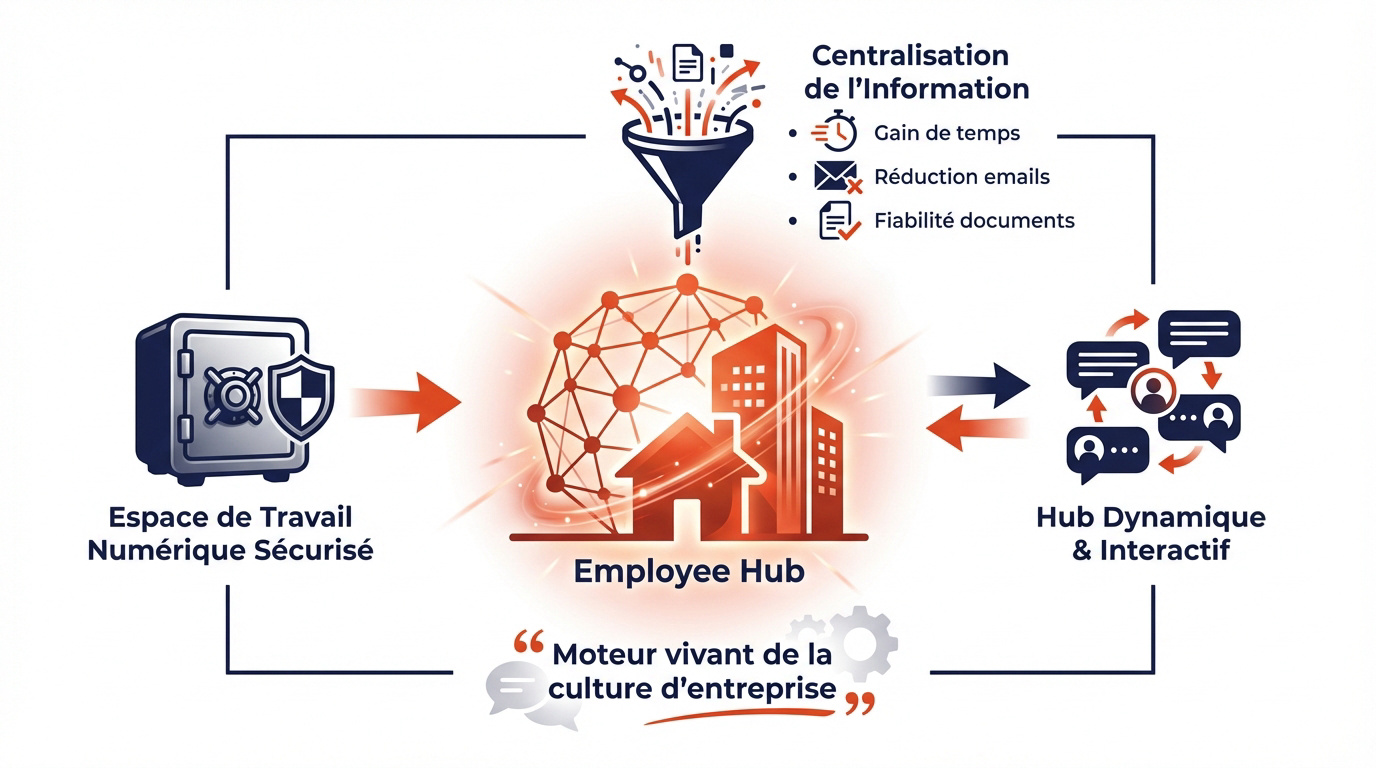 Moving from a static tool to a dynamic Hub
The "closet" intranets that nobody consults are definitively dead. To be useful, content must breathe and evolve every day. A static tool is a quickly abandoned tool.
You need to integrate real workflows directly into the interface. The tool must allow you to act concretely rather than simply read notes. That's where added value is created.
"The intranet is no longer a library of forgotten documents, but the living engine of corporate culture on a daily basis."
Highlighting professional interactions transforms the employee experience. Comments and shares breathe life into the system. A dynamic Hub stimulates spontaneous engagement and sustainably strengthens the sense of belonging within teams.
But beyond the technical aspect, what are the real impacts on your teams? Here's why you should take the leap.
Break down the silos that paralyze the organization. Communication must flow horizontally without obstacles. It's the key to successful modern collaboration.
Reduce the toxic dependence on internal emails. Group discussions are far more effective. You gain in clarity and speed of execution.
Speed up the transmission of important messages. Everyone receives the same information at the same time thanks to this internal communication tool for businesses.
 Strengthening the sense of belonging
Share the company's vision transparently. Employees need meaning. A well-managed intranet humanizes hierarchical relationships.
Celebrate victories, big and small. Highlighting individual successes boosts morale. It creates a positive dynamic throughout the company.
Embody the values of the employer brand. The intranet becomes the mirror of your corporate culture.
No longer overlook teams without a fixed desk. Mobile is their primary tool. Access must be universal and frictionless.
Offer short, impactful formats. Videos and notifications are ideal. You need to adapt to the field's rhythm.
Create a direct link with headquarters. No one should feel isolated by taking advantage of the benefits of a company intranet.
To turn these promises into reality, your platform must include specific, high-performing features.
Identify internal experts in just a few seconds. The interactive directory is a major productivity tool. No more endless searches through Excel files.
Organize the company's knowledge. Document management must be structured by topic. Each document must be in its place.
Ensure files are constantly updated. An outdated document is a potential danger. The freshness of information is crucial.
Automate the welcoming of new arrivals. A digitalized onboarding journey reassures new hires. Everything is ready from day one. It's a strong mark of professionalism for the brand image.
Centralize common administrative requests. Leave requests and pay slips are easily accessible. HR self-service frees up time.
Support skills development. The intranet becomes a continuous training lever for talent via this guide to welcoming a new employee.
Personalize the experience through algorithms. Each user sees what really interests them. AI sorts through the noise to keep only what's essential.
Use intelligent semantic search. You can find an answer even without the exact word. It's a phenomenal time saver.
Proactively suggest content. The tool anticipates employees' needs. It's the future of the intelligent and efficient Employee Hub.
Installing software is one thing; getting humans to adopt it is another, far more complex matter.
Listen to the frustrations of current users. Don't guess their needs; ask them. A serious audit prevents you from choosing an unsuitable tool.
Set concrete objectives from the start. Why do you want this company intranet? Clarity of purpose defines future success.
Involve internal ambassadors quickly. They will be your best allies for convincing skeptics.
Compare hosting models pragmatically. SaaS offers agility and simplified maintenance. On-Premise sometimes reassures traditional IT departments. It's a strategic choice that commits the company over the long term.
Assess the speed of go-live. The cloud often allows you to get started in just a few days.
Verify data sovereignty. Server location is a non-negotiable security criterion.
| Criterion | SaaS Solution | On-Premise Solution |
|---|---|---|
| Initial cost | Low | High |
| Maintenance | Low | High |
| Deployment | Fast | Slow |
| Sovereignty | Shared | High |
| Updates | Continuous | Periodic |
Draft a simple, clear editorial charter. Who publishes what and in what tone? A well-defined framework reassures contributors.
Train teams in content creation. Not everyone is a born writer. A bit of technical help changes everything for the smart working revolution.
Maintain a consistent publishing rhythm. Silence is the number one enemy of your new intranet.
Once the tool is launched, vigilance remains essential to protect your assets and optimize usage.
Segment information with great precision. Each role should only access relevant data. This limits the risk of accidental leaks. Rights management is the pillar of digital trust.
Apply the strictest security protocols. GDPR is not optional; it's an obligation. Your platform must be a vault.
Control the confidentiality of the most sensitive exchanges. Management spaces require total isolation. IT security keeps watch every day.
Closely monitor connection statistics. Who logs in and when? These figures reveal the real health of your internal community.
Analyze the content that generates the most interest. Learn from what works in order to replicate success. Intuition is no longer enough here.
Adjust your strategy based on direct feedback. An intranet that doesn't evolve eventually gets abandoned.
Use KPIs to prove the value of the tool. Numbers speak to decision-makers.
Data is nothing without the human analysis that allows for constant adjustments.
Deploying a modern company intranet centralizes your resources, streamlines cross-functional communication, and strengthens the lasting engagement of your teams. To transform your collective performance, prioritize the analysis of your user needs and mobile accessibility starting now. Your organization will thus gain in agility, building a secure digital work environment that's resolutely turned toward the future.
An intranet is a private, secure computer network exclusively reserved for the employees of an organization. Unlike the public internet, it's a closed ecosystem that centralizes resources, work tools, and internal news to facilitate teams' daily lives.
Its main role is to serve as the foundation for collective performance by optimizing internal communication and collaboration. It notably makes it possible to break down silos between departments, ensure access to reliable information, and strengthen employee engagement, whether they're at headquarters or in the field.
To meet current expectations, a platform must integrate an interactive directory, structured document management, and collaborative workspaces. Adding social features, such as personalized news feeds, "likes," and comments, is essential to transform a static tool into a dynamic, living hub.
The most high-performing solutions also offer seamless integration with third-party tools like Microsoft 365 or Google Workspace, as well as a mobile application. This "Digital Workplace" dimension makes it possible to centralize all HR processes, from onboarding to leave management, on a single, intuitive interface.
The distinction lies primarily in the scope of accessibility and the target audience. The intranet is strictly confidential and limited to the company's internal staff. It aims for operational efficiency and corporate culture among colleagues.
By contrast, the extranet opens certain parts of the network to trusted external actors, such as business partners, resellers, or specific clients. While both tools rely on similar technologies, their communication objectives and security protocols differ in order to protect strategic data.
Managing an intranet relies on the analysis of precise data in order to move from intuitive management to a results-driven strategy. It's essential to monitor the active adoption rate, user connection frequency, as well as the most popular search topics within the global search bar.
Engagement is also measured through social interactions, such as the number of shares or reactions on internal publications. These indicators make it possible to identify content gaps and adjust editorial governance to ensure the tool remains a sustainable productivity lever for the organization.
Successful deployment doesn't depend solely on technology, but on rigorous change management. It's crucial to involve internal ambassadors from the design phase and to define clear business objectives that address users' real frustrations, such as reducing email information overload.
Once the tool is launched, maintaining a consistent publishing rhythm and training teams are the keys to longevity. By integrating daily tools and highlighting employee successes, the intranet becomes an indispensable space whose usefulness is immediately perceived by all roles.

 Télécharger la ressource
pour ne louper aucune de nos actus